We've Only Scratched the Surface
It was Labor Day weekend 1969, the very same year Neil Armstrong walked on the moon, that the
ARPANET (the predecessor to the Internet) chirped its first packet. Now,
more than 57 years later, we've experienced giant leaps and bounds in Internet activity and even so, we've only scratched the surface. The prevalence of the Internet today will only pale in comparison to its extensibility and capabilities of tomorrow. The Internet  continues to grow daily in geometric proportions. The vastness of the Internet opens up so many possibilities with a wealth of experiences to be had by one and all.
But, just what is the Internet, really? Is it a bunch of fiber optics, copper wires, radio, microwave and satellite signals, all integrated, interconnected and inter-operating with the fastest, most powerful, most complex computing devices the world has ever known? What about the computer over at Sally's house, is it part of the Internet? The XBOX
at Jamal's house? Or, that cell phone on your hip or in your pocket book?
What part do they play in the Internet? Certainly we can all agree that
these devices, at the very least, represent consumers of the Internet.
Without a doubt, the Internet is the least expensive, most far reaching
delivery mechanism we've ever known. And its greatest possibilities are yet
to be seen.
The Internet is paradoxical in that it is both
overwhelmingly intimidating and extremely simplistic in nature, all at the
same time. Internet fortunes are earned and lost in almost the blink of an
eye. Every instant of every day, goods are sold, services bought, knowledge
exchanged, and ideas fermented. All of this activity causes hardly a ripple
with the gang at the online bridge club. It may sound trite but, the
Internet is what you make of it.

For this course, I don't require you to read Alvin Tofler's books, Future Shock, The Third Wave, or Revolutionary Wealth, although I would highly recommend you do so at some time in your life. The reason I point to his writings is that they have been, in many ways over the last 20+ years, a major contributing factor as to why I've made many of my life's choices based on NOT wanting to commute to a cubicle. I first became aware of
telecommuting when I read Tofler's book "Future Shock," printed in 1970. Unitl then, I didn't even know that the possibility existed. Currently, where I live and where I work were both determined by my resolve to avoid freeways like the plague (mainly sitting on them and not moving for seemingly hours on end). Although I love driving my late model sport sedan, I much prefer the comfort of my humble abode to that of an automobile or a workplace cubicle, any day. Most of the time, I can perform the same tasks from my family room couch as I had done, previously, from the cubicle. Teaching college courses online, obviously, gets me closer to that goal. My wife also telecommuted for years, as the Advertising Director for America's largest distributor of baseball equipment, Western Athletic Supply. If you've ever bought a baseball bat online or ordered a glove from their catalog, you were looking at my wife's work. I'll be sharing with you some of our insights and experiences along the way, but that's not the common thread I want you to focus on.
The common thread of the Case Studies in this course is, YOU; these Case Studies are all about You. Your learning, examining, researching, and evaluating the potentials of the Internet. So, it's very important that You participate to get the full benefits of this course. As long as you're participating, you should get a lot out of this course. Even if you don't end up being a Webmaster or E-Commerce entrepreneur you'll know how to better secure your Web browser, how to recognize a bogus email, how to effectively find things on the Internet, how to promote yourself on the Internet, how to tell if an e-commerce site is legitimate and secure, and lots more.
As an entrepreneur from way-back, I tend to think of the Internet and its opportunities in terms of business possibilities.
You may want to use it to share your life with other people - distanced around the world, to collaborate with colleagues on research or hobbies, or even, perhaps, to enhance your education - I hear that there are some pretty good college level online courses out there :-)
Whatever your future plans are for using the Internet, the most important time is right now! So, let's get started exploring. Let's see what this new fangled contraption is all about. I wonder if it will live up to all the hoopla? Perhaps it's just a passing fad?
DNS the Internet Phonebook
DNS the Internet Phonebook
In order to connect any two Internet-connected devices you
need to have an Internet phonebook. DNS, is short for Domain Name System, and a domain name
system is
exactly that, it's a system for recording and retrieving information
about all of the domains that make up the
Internet or an
intranet. Data communication devices are similar to telephones in that they
have a number, like a phone number, assigned to them and that number uniquely
identifies
that device. In the field of data communications a device's unique identifying
number is referred to as its Internet Protocol address or
IP address for short.
By knowing the device's IP address, it is possible for another data communication
device to contact it from anywhere in the world, as long as both devices have access to
the Internet.
There was a time before digital
data devices when people used to memorize the phone numbers of people or
places they called frequently. Similarly many network administrators might
connect to a device in their network using its IP address, but most of the rest
of the world won't know or use an IP address to contact a remote data
communication device, we want to connect to a remote device by using its name.
You are probably very familiar with a lot of these data communication device
names like: www.amazon.com, www.google.com, www.youtube.com, or www.facebook.com.
This need to connect devices using a name is why a system needed
to be developed which would keep track of all the device names and their corresponding IP
addresses. The domain name system is the system used to record and
retrieve the information needed to make the Internet work. Every
time you type a Web address, [technically referred to as a Uniform Resource
Locator (URL)], into a Web browser, that address has to be converted to the
correct IP address of the device you are trying to connect to. When you're
surfing the Net, it's a Web server's IP address that your computer needs to know in
order to establish a connection to it. The domain name system (DNS) was developed by a
bunch of really smart engineers and so therefore it is a very organized and
structured system, yet surprisingly very simple to understand once you learn how it works.
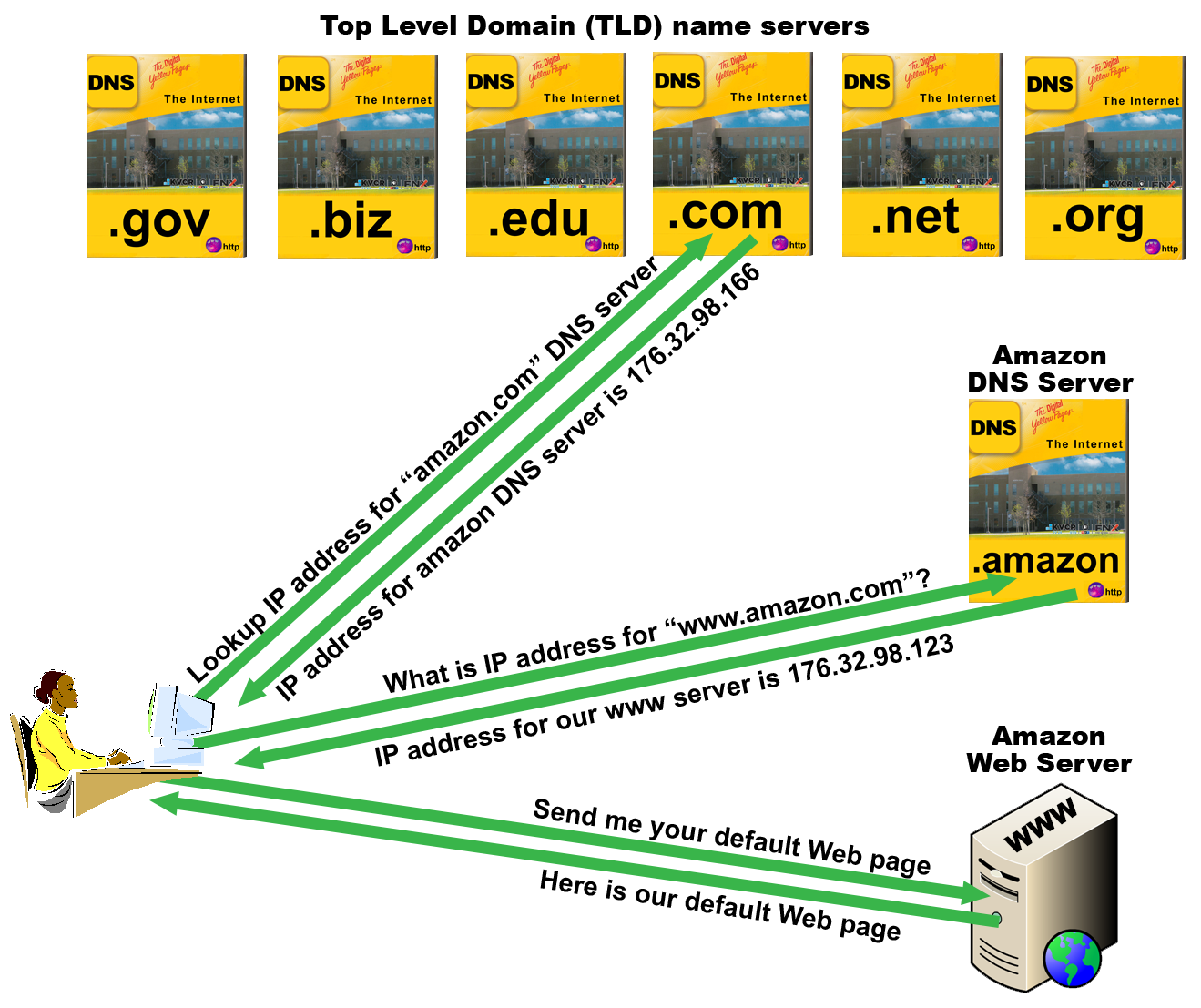 Figure 1: An example of how the domain name system (DNS) works.
Let's say you open your Web browser and you type in "www.amazon.com"
(without the quotes obviously, because with the quotes it becomes a text search
which is handled by search engines, but I digress). The way that data
communication networks work is that all the data that flows through it is
packaged in an envelope and that envelope contains two important addresses, 1) a
MAC addresss, and 2) an IP addresss. The MAC address is used when the message only
needs to travel to a device on the same network as the sending device. If the
message needs to be routed to a device on a network different than the sender's, then
its IP address and the receiver's IP address will be used to forward their
message back and forth and through the many
routers
it must travel before it reaches its destination. But, before the
sending device can put the IP address on the envelope of the message it wants to
send, it needs to
search a DNS server to find the IP address that goes with www.amazon.com.
This
is where it gets interesting, remember that the Web address you typed is also
known as a Uniform Resource Locator (URL), well it turns out that these smart
engineers have arranged the Internet's DNS servers at two levels. The first
level is known as the Top Level Domains (TLDs), you are probably familiar with
some of the popular TLD names like: .com (pronounced dot com), .net
(pronounced dot net), and .org (pronounced dot org), there are quite a few
other TLD names like: .edu, .biz, .mil, and .gov plus two letter country codes like
.us for United States, .jp for Japan, .fr for France, and .de for Germany. There are
several DNS servers operating in each one of those top level domains. The Web address
you type in your Web browser is sent to one of these DNS servers based on the address
(URL) you type. In our example of amazon.com your Web browser sends a DNS
request to the DNS server in the .com domain because that DNS server keeps
track of all the domains that end with .com and stores all of their
corresponding IP addresses. More specifically the .com DNS server has only the
IP addresses for the registered DNS servers that operate on behalf of the
second
level domains that end in .com.
Getting a bit tricky I know, hang in there. In
our example "Amazon" is the second level domain name in the Web address you
typed. The domain name server at the .com top level domain has the IP address
for all the DNS servers that Amazon has registered with it. The .com DNS server
responds to your computer's DNS request with "hey you were asking for the IP
address of Amazon.com's DNS server, right? Well here is the IP address you
requested.
So far, so good. However, we still don't have the IP address we need to connect to the Amazon
Web server, so our computer now sends a DNS request to the Amazon DNS server. We
can do this because we just got the IP address of the Amazon DNS server from the
.com DNS server. At the Amazon DNS server our request for the IP address which
corresponds to the Web address of www.amazon.com
is processed, this time using the "WWW" part of the URL. In amazon's DNS
server they have recorded the fact that they have a server with the name of
"WWW" and its corresponding IP address is 176.32.98.166. This information is sent back to our
computer and now our computer can complete a connection to the Web server (WWW)
at amazon.com because our computer finally has the all important IP address
needed to be able to correctly address all messages it needs to send to the
Amazon Web server.
An interesting point to notice is that Web addresses work
backwards. The first step in reaching a Web site is to actually send a request
to the .com DNS server. Next a request is sent to the Amazon DNS server, and
then our third message was the actual request to retrieve the Web page from the
Web server. Let's list the steps then in shorthand 1) .com 2) .Amazon 3) WWW -
which is just the opposite of www.amazon.com.
Registering a Domain Name
We'll start with a quick assignment that, I hope, you'll get a kick out of . . .
Let's pick out a domain name for your online business
To have a presence on the Internet you should first think about registering a domain name. Because that costs money, I am NOT going to force you to actually purchase a domain name. But I want you to at least be familiar with the process of selecting and registering one. Once you get one picked out, we'll be ready to use it
in the form below and in later case studies.
So think of a name; say your name is Bill. Do you want to be Bill.com? Bill.net? Bill.org? Bill.us? How about Bill.edu or Bill.mil, or even MyDomain.Bill. Well, unless you're a branch of the military I don't think you're going to get Bill.mil and if you're not an accredited educational facility we'll have to count out Bill.edu, but there are millions of possibilities available, so next we'll see what we
can register.
| Step 1 |
Select a name you want to register. You'll also want to know which TLD you want to register with, i.e. .com, .net, .org, .info, .name, etc. |
| Step 2 |
Go to a domain registrar's Web site, like, Squarespace or GoDaddy and use their Domain Name Search application to find out if your domain name is available for registration. If the name you've chosen for a particular TLD is already taken, then come up with another name or TLD and try again. |
- You must come up with a domain name that has not been registered by anyone else.
- You may use any Domain Registrar you'd like, to verify that your
domain not has not already been registered by someone else.
- Once you come up with a name that is available and not registered by anyone else, you may register that domain name
with an official domain registrar if you'd like - but, you DON'T have to register your domain name
with an official registrar! You DO need to enter
your domain name in the form below.
Step 3 Complete and submit the
form below to receive 30 points.
Fill in this form, print it out for your records & then click
the "Submit" button at the bottom