Lesson Objective:
In this lesson you will examine the history and significance of the Internet
infrastructure. You will also compile and assess the Internet Service Provider (ISP) needs of your company. Plus, you will learn how to identify your own computer's network interface properties like it's physical address, its network architecture type and its TCP/IP settings.
Introduction
The Internet has improved many of our old paradigms of communication and invented a few new ones of its own. In addition to the email that we now almost take for granted, the Internet provides us with vast vaults of mental and audio/visual stimulation; all at the click of a button. It gives us access to friends and family, software, journals, books, music, scientific research, politics, even instant movies, without ever leaving our humble abode. The Internet has invented several of its own methods of communication, with the advent of "Instant" or "Text" messaging and the ever so quintessential forum, for talking much about nothing, the "Blog." The Internet permeates our homes, infiltrates our places of work, and now, with the disbursement of Internet "hot spots" and cell phone access, "it", is accessible from almost anywhere in the world, and possibly soon enough, anywhere in the universe.
Where to Start?
One of the first things I tell students who are getting into the field of networking and information technology, is "you can't know it all." That's true, nobody does! If you ever meet someone who claims that they do? Well, then, they're a liar!!! In order to understand something as big as the Internet, you need to break it into smaller parts, mold it into something a little more
digestible. And, in order to break things up into smaller pieces you need to pick a starting point.
In the field of Data Communications there is a reference model that has been developed and used for decades. The Open Systems Interconnect (OSI) reference model is what I am referring to. If you'd like to learn about the OSI model in greater detail you should enroll in one of my CSIS 202 - Introduction to Networking and Data Communications courses. In short, the OSI model is used to organize and compartmentalize, by layers and sub-layers, the numerous components and complexities involved in getting two computers to be able to exchange data with each other. Since the Internet is just a giant collection of networks itself, then we can apply the same basic layered concept to the Internet and its infrastructure. We'll start from the bottom and work our way up. So let's get started. Let's take a look at the plumbing of the Internet. Better put on your thinking caps and your galoshes, we're headed into the underbelly of the Internet; this could get messy. I wonder if
Mike Rowe knows about this?
Private Networks
A computer network is defined as: "two or more computing devices equipped with transceivers attached to a shared media." Similar to what you see in
figure 1, computer networks that are physically confined
geographically to a location like a room, a building, a campus, or a hotspot are called Local Area Networks (LANs). The computing devices that are
connected (including wireless devices) to the local area network are referred to as nodes
or hosts. In order to communicate on a network each node must have a properly configured device which is capable of transmitting and receiving messages, this device is known as a transceiver
or a network interface card (NIC). Each transceiver will send and receive messages over some type of media, usually copper wire, fiber optic cable, or in the case of wireless transceivers,
over airwaves. As was just illustrated, the media used by the transceivers can vary depending on the transceiver type and the needs of the network. Today, most LAN nodes are interconnected using unshielded twisted-pair (UTP) cabling. If the node is wireless, more than likely, it will be using an 802.11g wireless transceiver which uses the 2.45 - 2.5 GHz band of radio frequencies(RF) to carry the data.
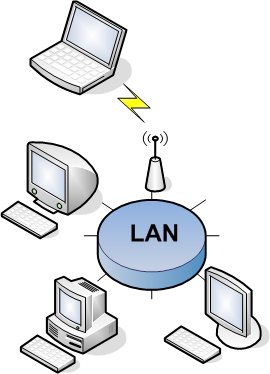 Figure 1: Illustration of a local area network (LAN)
Large companies that have computers in many different locations around a city can form their own Metropolitan Area Networks (MANs) as shown in figure 2 and if they are spread throughout a single country or worldwide
across many countries, they can create their own Wide Area Network (WAN) as shown in figure 3. In both the case of the MAN and the WAN, usually, a telecommunications provider
(AT&T, Verizon, etc.) is needed to provide leased phones lines that connect one location's LAN to another
location's LAN. Privately leased lines are expensive, the advantage to businesses and universities is privacy and security. Since the organizations leasing the lines are the only ones having access to them they are considered safe and secure, mainly because they are not using a public network like the Internet to transfer data from one location to another.
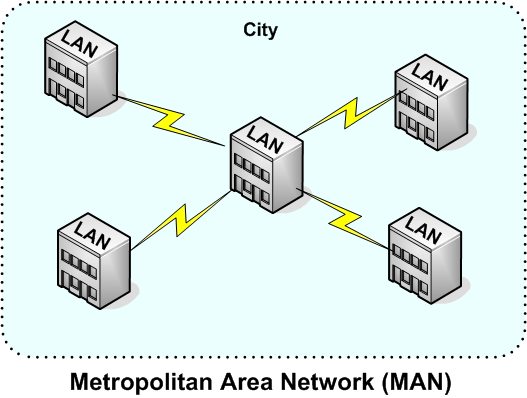 Figure 2: Illustration of a metropolitan area network (MAN).
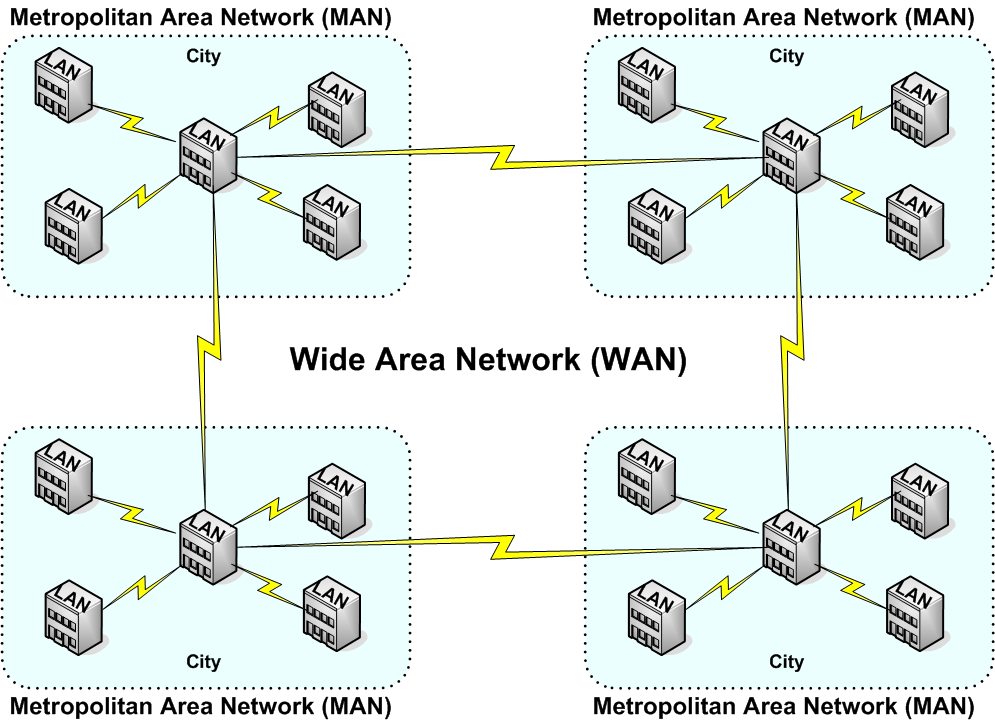 Figure 3: Illustration of a Wide Are Network (WAN).
The Internet
Simply stated, the Internet is the largest WAN in the world (see LAN and WAN for context). A more verbose definition would be, the Internet is a publicly accessible infrastructure of interconnected routers, switches, and access points which process and forward packets of information from one host to another using protocols defined by the Internet Engineering Task Force (IETF). Some of these protocols are commonly known, like http for instance. The Hypertext Transfer Protocol (http), also known as the World Wide Web (WWW), is how Web browsers communicate back and forth with Web servers. In other words the World Wide Web is a service that operates over the Internet infrastructure. The Simple Mail Transfer protocol (SMTP), or email, operates this way as well. Email servers are simply computer software utilizing the SMTP protocol to service send and receive requests. These servers process and forward emails over the Internet's infrastructure using SMTP. Email clients generally use
the Post Office protocol (POP) to communicate with email servers over the Internet's infrastructure to send and retrieve electronic messages.
A Brief History of The Internet
 A Logic Named Joe
So how did the Internet get started? Some say the journey began in 1946 when a writer of science-fiction comics, using the pen-name of Murray Leinster (real name William F. Jenkins), wrote a story called A Logic Named Joe which described, to some degree, concepts that would be used by the Internet decades later.
The Advanced Research Projects Agency
In 1958, for defense purposes spurred on by the Cold War and Russia's launch of Sputnik, a branch of the United States Department of Defense (DOD) was established and referred to as the DOD's Advanced Research Projects Agency (DARPA) which was later renamed ARPA by officials who felt that the "D" (which represented the Department of Defense) should be removed from the acronym in order to make the organization's name less ominous sounding. The organization has since been renamed again back to DARPA. At about that same time, during the late 1950's, a gentleman by the name of J. C. R. Licklider, known as JCR or "Lick" to his friends, colleagues, and acquaintances, worked as a vice-president at a company called Bolt, Beranek, and Newman (BBN). Based on the projects that Lick and his co-workers worked on at BBN, in 1960 he began writing a series of three papers known as the Galactic Network memos which described his vision of a galactic network - a network of computers that allows users to gather data and access computer programs anywhere in the world. The first paper he wrote Man-Computer Symbioses, described Licklider's view of man's interaction with computers and the need for computer time sharing.
 J. C. R. Licklider
A year later another Internet visionary and Massachusetts Institute of Technology (MIT) professor, Leonard Kleinrock, wrote a paper on packet switching networks. In 1962, Licklider wrote his second paper titled,
On-Line Man Computer Communication, describing the concept of social interaction through the networking of computers; later that same year Lick was appointed as the first director of the Information Processing Techniques Office (IPTO) for ARPA.
First Packet On The Internet
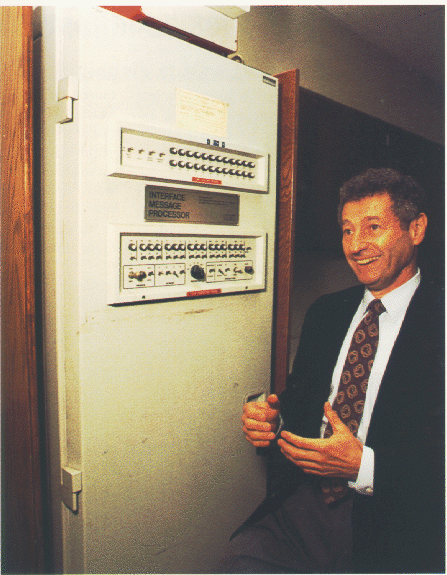 Leonard Kleinrock with first IMP
In 1965, MIT researcher Lawrence G. Roberts and Thomas Merrill made the first interstate connection of computers by telephone line; proving that computer network communication would have to use "packets" to exchange data instead of using single bits at the circuit level. In 1966, Roberts joined DARPA and in 1967 completed drawing up a plan for realizing Lick's dream, the ARPAnet. In 1968, Licklider and Robert W. Taylor wrote the third and final paper about Lick's Galactic Network which was titled The Computer as a Communication Device. Further work by Robert Kahn, Kleinrock, and others brought the ARPAnet closer to fruition until in 1969 it became a reality. The now UCLA computer science professor Kleinrock and U.S. DOD contractor BBN were instrumental in establishing communication between the first two nodes of the ARPAnet, UCLA and the Stanford Research Institute (SRI), on October 29, 1969 with the implementation of two
Internet Message Processors (IMPs) installed at each site. Professor Kleinrock was supervising his student/programmer Charley Kline (CSK) and they set up a message transmission to go from the UCLA SDS Sigma 7 host computer to another programmer, Bill Duvall, at the SRI SDS 940 host computer. The transmission itself was simply to "login" to SRI from UCLA. They succeeded in transmitting the "l" and the "o" and then the system crashed! Hence, the first message on the Internet was "lo", as in "lo and behold! They were able to do the full login about an hour later.
From NCP to TCP/IP
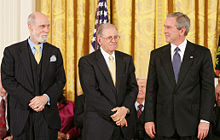 Vint Cerf & Robert Kahn with President George W. Bush
The first communication protocol designed for use on the ARPAnet was called the Network Control Program (NCP). During the year 1970, the Arpanet is growing at the rate of one node added per month. In 1972, Ray Tomlinson of BBN writes the first email program to send messages across the ARPAnet, he uses the @ sign to test his program by sending an email to himself. In 1973 Vint Cerf and Robert Kahn began writing a paper later published in May 1974 describing the Transmission Control Protocols (TCP). In December of 1974 the term "Internet" began to be used to describe a global TCP/IP-based network of the ARPAnet along with several other, mainly X.25-based, networks that were cropping up in the U.S. as well as Canada and Europe (Britain & France). However, it wasn't until flag day of 1983 that the ARPANET officially adopted TCP/IP as its core networking protocol.
The story of the development of the Internet is told in the book Where Wizards Stay Up Late.
Reluctance of Early Adopters
In the beginning there was a lot of resistance by large companies, research facilities, and places of higher learning to join the Arpanet; all of them had large, powerful computer networks of their own, and didn't really want to share them with others, so their acceptance of the idea of joining their networks together with others via a public, unsecured, network was not a vision embraced by many network administrators of the day. The Internet then got a little more prompting from the U.S. government. In 1988, Vice President Al Gore, heard a report titled Toward a National Research Network by UCLA's Kleinrock, which prompted Gore to introduce a bill into congress, the High Performance Computing and Communication Act of 1991 which led to the creation of a document called the National Information Infrastructure (NII) defining four Network Access Points (NAPs) to be located in Washington D.C., Pennsauken, N.J., Chicago, Il. and San Francisco, CA, for providing regional access to what was then emerging into the mother of all WANs, the Internet. The National Science Foundation (NSF) awarded contracts for operations and maintenance of the original four NAPs to MFS Datanet, Sprint, Ameritech, and Pacific Bell respectively.
25th ARPANET Anniversary Celebration
The Internet Spawns The World Wide Web
 Tim Berners-Lee
As more and more people who had influence over the huge and previously private
data networks realized the benefits of the Internet, one by one they began joining.
The Internet began growing rapidly, by 1990 the ARPAnet was phased out. In 1991 the Gopher protocol
was released by the University of Minnesota, and the World Wide Web (WWW) is developed by Tim Berners-Lee and released by the European Organization for Nuclear Research - CERN, and the rest as they say "is history." Tim Berners-Lee wrote about the development process in his book Weaving the Web.
Internet Exchange Points (IXPs)
Several telecommunications mergers have occurred since the formation of the original ARPAnet network access points (NAPs) resulting in many of the NAPs being owned by Verizon, who subsequently bought MCI. MCI owned a trademark on Metropolitan Area Exchanges (MAE), so you'll hear many of the Internet's NAPs also referred to as MAEs, i.e. MAE-West or MAE-East. But, not all NAPs were MAEs! Today, NAP is a legacy term only found in the history books and the huge infrastructure of access points to the Internet are called Internet Exchange Points (IXPs).
Telecommunications providers, Verizon, AT&T, Sprint, and the like, are big players on the Internet because they provide the connectivity between all those LANs, MANs and WANS. Follow the three links below to learn more about the Internet backbone providers. The first link leads you to a page of more links, this is Russ Haynal's Internet Map Collection. With all of the mergers between telecommunications companies lately, many of Haynai's links are now broken.
Links of Interest
Internet Service Provider (ISP)
An Internet service provider (ISP) is a company who usually has paid fees to be attached to Internet Exchange Providers (IXPs). An ISP can provide services for accessing, utilizing, or participating in the Internet. Like most, your home or business data communication routers connect to the Internet through an ISP. Now many times the ISP is also your local telephone company, but not always, in fact due to the Telecommunications Act of 1996 competition for your communications dollars is still quite robust although it's hard to tell how long that will last as huge telecomms continue to gobble up the littler ones.
Depending on the ISP they can provide you with one or more services like television service, Internet access from your home or business, Internet transit, domain name registration, web hosting, Usenet service, and colocation. In other words they give you connectivity to the rest of the Internet through their network which is ultimately attached to a IXP and additionally offer services that take advantage of and monitizes that connection.
In a home environment ISPs pretty much do all of the work for you. They will install your Internet router, attach your home network to it, and configure all of the necessary settings to get the homeowner up and running with access to the Internet including an all important public "IP address."
In a business environment ISPs will provide any wiring necessary up to the
Maximum Point of Entry (MPoE) or the company's Main Distribution Facility
(MDF). It is up to the company's IT personnel to get their LAN configured to
work with the ISP's Internet connection.
TCP/IP Properties
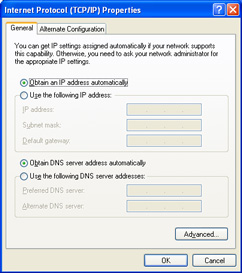
Figure 1: TCP/IP Properties set to automatic.
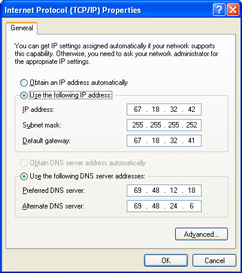
Figure 2: TCP/IP properties manually entered.
Just like a telephone needs a phone number to uniquely identify itself on the telephone network, computer nodes need an IP address to be able to send and receive data over the Internet. Depending on your needs, one or more IP addresses will be provided to you by your ISP. The IP address a node uses to communicate on the Internet is called its Public address because it is used to send and receive over a public network, the Internet. In order for your network nodes to be able to communicate on any IP-based network, the node must be properly configured with the appropriate TCP/IP properties either manually, or automatically using DHCP. Figure 1 shows the TCP/IP configuration dialog box for a node which will be automatically configured by information it receives from a DHCP server. Figure 2 displays the TCP/IP properties dialog box of a node which has had its information configured manually, look closely and you will see that all of the necessary information has been typed in by a network administrator.
An IP address is written in the Dotted Decimal Notation e.g. # . # . # . # or 67.18.32.41. Each of the four numbers represents an octet which is 1 byte, or 8 bits. This means each octet can contain a value of 28 or in decimal, from 0 - 255, and will be determined by, and assigned by, your ISP.
Your ISP will also inform you of the Subnet Mask your network node(s) must use and the IP address for your Default Gateway which will be used by all nodes on your network. Here is an example of what a subnet mask looks like: 255.255.255.0. Your default gateway's IP address must be an IP address that uses the same network address as your node.
An IP address actually contains two pieces of related information, 1) which network your node is connected to (a.k.a its Network address), and 2) which unique host number it is on your network (its Host address), in case you have more than one IP host (node) attached. The subnet mask used in the example indicates that the first three octets of your IP address represents the network your node is attached to and the last octet is your node's host address, which uniquely identifies it on its network. In the example the assigned subnet mask the network uses indicates that you can have a maximum of 2 nodes attached to your public network. Don't worry about figuring that one out right now, because the process of ANDing an IP address to its subnet mask is a bit much for this course. Just get the basics - you need one or more public IP addresses, a subnet mask (all nodes on your LAN will use the same one), and a default gateway (again, all nodes will use the same one).The default gateway identifies the device (usually a DSL or cable modem) that connects your network to your ISP's network, where your node will forward and receive data to and from when accessing the Internet.
All this information will be provided to you by your ISP. Many ISPs these days offer many other services in addition to providing just Internet access; we'll talk about some of them, like Web hosting and file storage, later on in this course.
Dial-Up vs Dedicated vs Roaming

It is not as common anymore, but in the not too distant past, many people used a dial-up connection to access the Internet or their place of work, using a computer modem. Which isn't quite as bad as having to use tin cans for phones - but close. Pause and think about the fact that right now there is a whole generation of humans being born who will never know the headaches of having to use a dial-up connection to access the Internet.
The type of connection you have is not always an economical choice. At present, the first question that needs to be answered is "what service is available in my area?" Then you ask "how much does it cost," and "can I afford it?" You can find answers to these questions by calling your local service provider(s) - which you may have to do if you don't already have an Internet connection available. But, then, I have to ask, how are you reading this screen? If you do have access to the Internet then it is quite easy to search and find what services are available in your area and how much it will cost.
Dial-Up & the Central Office
Dial-up remains problematic and is slowly, but surely, being replaced with higher speed, "always on," dedicated connections. If the phone or cable company is digging up the streets in your neighborhood, more than likely, they are installing fiber cabling that reaches from their nearest switching facility (called a Central Office or CO) to your neighborhood. The limiting factor that has always been the bottleneck for even more households getting high-speed Internet has been that the phone lines were all made of copper, just like an American penny. Ma Bell and others have been stringing copper wire from one CO to the next, and from each CO to each household, for over a century. That's a lot of copper. Problem is, the farther your node is from the CO, the worse the quality of the single on the wire is. With voice you hardly ever notice a problem, but with high speed data the fact that the signal "attenuates" the farther it travels means a lessor amount of data can be reliably transmitted back and forth.
Mobile with WiFi
Roaming is a fairly new phenomenon and like anything having to do with electronics there are competing standards. WiFi came first and continues to be popular with open networks being provided by city and other government agencies. Many university and college campuses offer their students and employees free WiFi access to the
Internet as well. WiFi refers to the IEEE 802.11 standard for wireless data communications. Almost all computing devices created after 2014, laptops, handhelds, Pocket PCs, Tablet PCs, and pretty much all models, have built-in support for 802.11 wireless technology. So currently you'll find that many coffee shops, bookstores, shopping malls, city plazas, and the like, are providing WiFi "hot spots" for accessing the Internet. People taking advantage of these hot spots are considered to be "Mobile" users, gaining access to the Internet wherever a hot spot is accessible. The downside is that there are wireless hackers out there looking for accessible hot spots as well, including at YOUR house - it's called "war games" driving. War games driving is where someone cruises around in their car from neighborhood to neighborhood looking for unsecured wireless access points. So that wireless connection you are using to view this Web page with, if it's not secured, could be being shared with somebody parked out in front of your house right now.
Roaming with Cellular
Then along came the cellular phone companies, who began offering Internet access through their communications networks. And, many of the big ones, like Verizon, opted to implement the EVOC wireless technology instead of 802.11. So while most of us consumers, who have already invested in wireless technology, all use devices based on 802.11, we now need to add-on another transceiver that is EVOC compatible if we want the Internet via our cell phone providers' network. Cellular companies can offer their customers the ability to roam from one location to another without losing their connection to the Internet, as long as they don't lose cell service - so these users are "roaming" users of the Internet.
Bandwidth
Bandwidth is a measurement of the amount of data that can be transferred through a connection under optimal conditions. Picture it as a pipeline from one data communications device to another. Just like water flowing through a pipe can be measured in gallons per second (gps), bandwidth is usually measured in bits per second (bps). It is important to note that the word "bits," when abbreviated, is a lower-case "b" and not an upper-case "B" which is used to represent "bytes" when identifying storage capacities e.g., 500 gigabytes of hard drive space would be abbreviated as 500 GB. Also just like water, the bigger the pipe is the more the data can flow through it. In the case of the connection provided you by your Internet Service Provider (ISP) to access a remote location and/or the Internet you're going to have to pay for that pipeline, and its size. Yes, size does matter!
-
A full page of English text is about 16,000 bits (16 Kb).
- Full-motion, high-definition video requires roughly 10,000,000 bits per second (10 Mbps), depending on compression.
- A DSL connection can move about 1,544,000 bits in one second (1.544 Mbps).
- Newer Internet Service Provider (ISP) connection options use fiber-based media and offer speeds up to 100,000,000 bits per second (100 Mbps).
- Many modern day local area networks (LANs) used in homes and businesses operate at connection speeds of 1,000,000,000 bits per second (1 Gbps).
If you're lucky enough to be living in one of the newer housing tracks built after about the turn of the 21st century, you are probably able to access "High-Speed" Internet. "High-Speed" being a relative term, relative to whatever is the fastest and most affordable access method of the moment. Most residential nodes are still using one flavor or another of Digital Subscriber Line (DSL). Originally DSL service meant that the subscriber was receiving data at a rate of 1.544 million bits per second (Mbps), but would only be able to transmit data at a rate of 384 thousand bits per second (Kbps). This is because the most common type of DSL offered by ISPs is "asymmetrical" DSL (aDSL) which means your uplink speed is not the same as your download speed. If the up and the down speed are the same, then that would be "symmetrical" DSL or sDSL, which is more expensive." Today, with "High Speed" Internet, subscribers are receiving rates up to 100 Mbps
and more and are transmitting at rates of 10 Mbps and higher.
Throughput
Another term you want to be familiar with is "throughput" which is how much data actually gets through to its destination. Due to weather conditions causing "noise" on the telephone wires, congestion on the Internet or your own network, data doesn't always make it to its destination on the first try. Fortunately the TCP/IP protocol is smart enough to recognize this and when errors do occur TCP/IP simply re-transmits the lost "packets." What this means is that if your bandwidth (pipeline) is 10 Mbps and due to poor line conditions or network congestion 50% of those packets don't make it to their destination the first time, then your throughput is only 5 Mbps. Fortunately, the modern day data communication networks in most areas are fairly noise free and extremely reliable.
Bandwidth Table
Related Info
Case Study A Worksheet and Report
Now that you're educated to the ways of the Internet's infrastructure, let's put that knowledge to work.
Step 1: First, you will complete the Case Study A ISP Worksheet by analyzing 3 different ISPs and the Internet service packages that they offer.
Click on this button to go to the Case Study A ISP Worksheet:
Step 2: You'll need to complete the
Case Study A Report, by checking out your own computer's network interface settings. Be sure to view the appropriate instructional links that I've posted for help on completing this Case Study A
blog. They'll be listed at the top of the Case Study A blog instructions screen on the right and are organized by the type of computer you are using to complete the assignment, Windows-based computer or Mac-based computer. The links most helpful to Windows-based users are marked with the Windows icon, and the lessons marked with the Apple logo are designed to assist users of Apple Macintosh computers.
Click on this button to go to the Case Study A Report instructions: