Build It and They Will Come

The Internet isn't a "one-way" street; I know I don't have to tell you that. If you've spent any time using the Internet you know that hackers (actually crackers) are always trying new methods to get past your firewall and into your network. Compound that traffic with virus attached emails and spam mail and that's a lot of incoming traffic. It's all coming our way, but it's not really the kind of traffic we want. We want people who need our product or service to come to our Web site. How do we get their attention?

As you will learn next week from reading Tutorial 4 in your textbook, Internet search engines like Google, Yahoo, MSN, etc. use Web robots called "bots", "spiders", or "crawlers", that are used to index the trillions of bytes of information that are accessible via the Internet. What are those bots/spiders/crawlers looking for? Lots of things, it depends on the search engine, most of the answers to that question are closely guarded proprietary secrets locked away in a vault at company headquarters somewhere. There are college courses you can take where the entire curriculum is devoted to nothing but learning about Search Engine Optimization (SEO). Some search engines do offer Web developers guidelines to follow. I won't be testing you on this, but take a moment to browse through Google's Webmaster Guidelines.

Since part of getting your new Internet-based company started has been analyzing the marketing and distribution potential of the Internet it would only make sense that we should start thinking about how we might be able to attract potential customers to your company's Web site. To begin with, we need to outline the proper approaches for developing content that we will be distributing via the Internet. I find that when building Web sites for a particular industry, it's a good idea to see what Web sites for that industry type already exist and analyze what and how their information is organized. Try to understand the look and feel of the Web pages. What menu titles are being used. What type of message is being conveyed to their customers. It's also helpful to see what keywords and descriptions are hidden in the pages' meta tags. In this exercise you'll be studying the form and structure of Web sites similar to the type of business you want to build
your Web site for, and you'll be going on a bit of a scavenger hunt looking for meta tags.
Case Study 3 Assignment Instructions
To receive full credit for this assignment please read
all the instructions below and complete both assignments (3.1 & 3.2) by the due date listed
for Case Study 3 in the Syllabus.
Assignment 3.1 DB Post
Step #1
- Search the Internet and locate 3 different Web sites
that promote businesses similar to your fictitious online company
- Create a new discussion thread in the CS3: Build It & They Will Come
forum
- List the Home page URL for each of the
Web sites you view in your CS3 discussion forum thread
- Write a brief analysis of each Web site
including the following information:
- What first caught your eye on the home page?
- How is the overall appearance of the site? Good/Average/Poor?
- Is the site well organized? Can you easily find the information you're looking for?
- Notice the location of key elements on the page. Where is the logo located? Is the navigation system (navbars) horizontal, vertical; top, left, right, bottom?
- What methods are there to locate information within the site? Search box, navbar, other?
- What does the structure of the site, the colors used for the various site elements, the quality of images and organization "say" about the site?
Once you have added the information listed above to your CS3 Build It and They Will Come discussion
thread, continue to Step #2 to learn how to locate a Web site's
meta tags and to create some keywords and a description for your own
fictitious Web site
Step #2
- For each of the 3 Web sites from above (Step
#1) and for Your Own Web site list the following:
- Don't panic - to complete this step read these instructions:
- While viewing the home page for each Web site you located in the
Step #1
above
- Click on the View menu on your Web browser's
Menu bar and then choose "View Source"
or similar choice if you're not using Internet Explorer as your Web browser. For instance,
Google Chrome and
Firefox have the choice of "View Page Source". If your Web browser doesn't have a visible
View menu, try right-clicking on the Web page (Ctrl+click on a Mac) and choose "View Source" or something similar from the context menu that appears.
- Once you are viewing the source code for the Web page, look in the
<head> section of the source code
(see figure 1 below) and see if you can find any
<meta> tags that read
name="description" and
name="keywords"
- List the "content" portion for both the
keywords & description meta tags (see figure 1 below).
- Repeat the process for each of the three Web sites you selected in
Step #1.
- Then, think about which keywords and/or descriptions would be
good for your own Web site.
- Post your meta tag keywords & descriptions along with your analysis from
Step #1 in the Discussion Board forum
CS3: Build It & They Will Come.
Note: Be sure to remember to add
a description and a list of keywords for your own Web site as well.
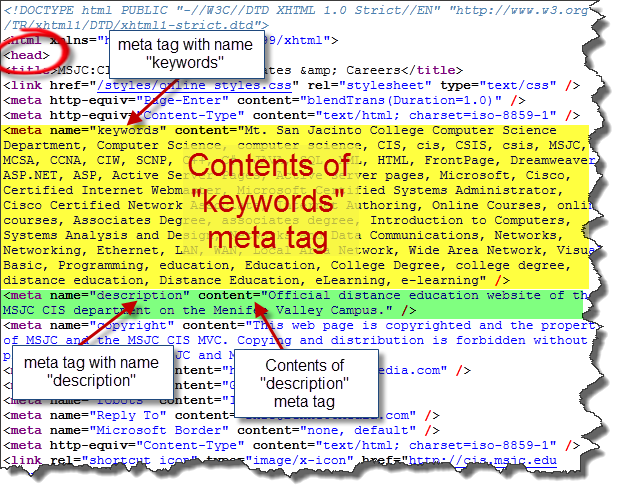
Figure 1 - Web page source code with the contents of the keywords and description meta tags highlighted.
Chuck's Example
In order to receive the highest possible score for steps 1 and 2 of this assignment view Chuck's example.
Assignment 3.2 Blog Post
Step #1 Read at least three other student's posts in the
CS3 "Build It & They Will Come" discussion board forum.
Step #2 Write a summary as to what you learned about Web site development and meta tags from doing this exercise and reading the posts from your fellow students.
Step #3 Post your summary using the CS3 blog titled
CS3: Summary.
You can access the blog quickest by clicking on the Blogs in the
Course menu; or, you can use the link to the blog
located inside the Lesson 3 folder
which you can access by clicking on the Learning Units link located in the Course menu,
then open the Learning Unit 2 folder to see the
Lesson 3 folder, open it and you will see a CS3: Summary
link which will open the CS3 blog when you click the link.
Scoring Rubric
In order to receive full credit for this assignment you need to be sure
that you have completed the following:
Assignment 3.1: Posted a thread to the CS3 Discussion forum Build It They
Will Come and included all of the following information:
- URLs (Web addresses) of the 3 sites you visited
(12 points, 4points per URL)
- Your Web site analysis of each of the 3 sites (24
points, 8 points per analysis)
- Each Web site's keyword & description meta tags
(24 points, 4 points for each group of keywords and 4 points for each
description)
- The description and keywords you created for
your own fictitious
Web site (20 points)
Assignment 3.2: Posted a blog post to the CS3: Summary blog which summarizes what you
learned about Web development while completing this week's assignment. Be
sure to include your thoughts on:
- How easy was it to view the keyword and description meta tags of
the Web pages you viewed? (5 points)
- What is the purpose for including the keyword and description meta
tags at the top of a Web page? (5 points)
- How importance do you think it is to use the keyword and
description meta tags in Web pages you will create? (5 points)
- Did any other student post meta tags or Web sites that were
similar to what you posted? (5 points)